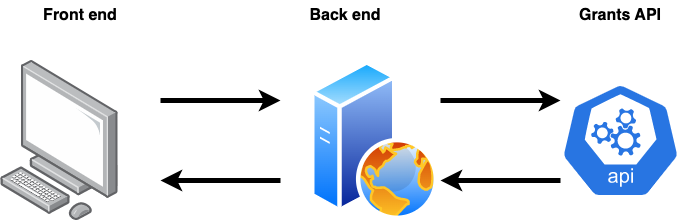
This is a minimal HTML/CSS/JS application that creates a basic grants matcher in a few minutes. It uses a back-end-proxy.php file to make requests to the Grants API. You can see the application in action here: /front-end.html
This method prevents your API key being exposed to the end-user and also allows you to do any filtering of results before using them in your front-end. For example, you may wish to only show certain Regions in the select box or filter out certain grant providers before presenting them to the user.
First we have our basic front-end using HTML, CSS and JavaScript which displays two select fields, Sector and Region with a Submit button. The Sector and Region select options are populated from the Grants API via a fetch() to our back-end-proxy.php file.
<!DOCTYPE html>
<html lang="en">
<head>
<meta charset="UTF-8" />
<meta name="viewport" content="width=device-width, initial-scale=1.0" />
<title>5 Minute Matcher - A basic Grants API front-end</title>
<!-- Allows us to use templates to display arrays of data.
We'll use it to display the purpose results from the API. -->
<script src="https://cdn.jsdelivr.net/npm/[email protected]/dist/handlebars.min.js"></script>
<style>
body {
font-family: Arial, sans-serif;
color: #333333;
margin: 20px;
padding: 0;
}
header {
background-color: #1c4b9b;
color: #fff;
padding: 10px;
}
main {
display: flex;
margin: 40px 20px;
min-height: 600px;
}
.form-section {
width: 200px;
padding-right: 40px;
}
.results-section {
flex: 1;
}
form {
display: flex;
flex-direction: column;
}
#form-error {
color:red;
font-size: .8em;
}
label {
font-weight: bold;
margin-bottom: 10px;
}
select {
width: 100%;
padding: 5px;
margin-bottom: 10px;
}
button {
margin-top: 20px;
padding: 10px;
}
#result-summary {
margin-bottom: 20px;
}
.result-item,
.purpose-item {
margin-bottom: 10px;
border: 1px solid #ccc;
border-radius: 4px;
padding: 10px;
background-color: #f9f9f9;
box-shadow: 0 2px 4px rgba(0, 0, 0, 0.1);
transition: background-color 0.3s;
}
.result-item:hover {
background-color: #eaf7eb;
cursor: pointer;
}
.results-transition {
transition: opacity 0.3s ease-in-out; /* Customize the duration and easing as desired */
opacity: 1; /* Initial opacity value */
}
.results-transition.fade-out {
opacity: 0; /* Opacity value when fading out */
}
.purpose-item {
background-color: #eaf7eb;
}
.purpose-item h3 {
text-align: center;
}
.purpose-item > a {
color: blue;
cursor: pointer;
margin-bottom: 20px;
}
.purpose-item-row {
display: flex;
margin-bottom: 5px;
}
.purpose-item-row > div:first-of-type {
width: 30%;
text-align: right;
margin-right: 10px;
}
.purpose-item-row > div:nth-of-type(2) {
width: 60%;
}
</style>
</head>
<body>
<header>
<h1>5 Minute Matcher - A basic Grants API front-end</h1>
</header>
<p>
This is a basic/minimal HTML/CSS/JS front end that makes requests to a
back-end-proxy.php file. It first makes two GraphQL calls to get the
Sector and Region choices then, once the form is submitted, it requests the
results. When a result is clicked it then makes a further call to fetch
the purpose details to display to the user.
<ul>
<li>This is a minimal example and doesn't do the full validation and
error handling that would normally be present.</li>
<li>The back-end-proxy.php file uses the test API key so it will always return the same 2 Purpose results regardless of the Sector and Region passed in.</li>
<li>Once you replace the test API key with your live one then real results will be returned.</li>
</ul>
</p>
<main>
<!-- A basic form which display just two of the possible select options-->
<section class="form-section">
<form id="grant-form" method="GET" action="">
<label for="select_sector">Sector:</label>
<select id="select_sector">
<option value="">--Select a Sector--</option>
</select>
<label for="select_region">Region:</label>
<select id="select_region">
<option value="">--Select a Region--</option>
</select>
<div id="form-error"></div>
<button type="submit">Submit</button>
</form>
</section>
<!-- The area to display the results and purpose profile -->
<section class="results-section">
<div id="results" class="results-transition"></div>
</section>
</main>
<!-- A template to display the purpose results-->
<script id="result-template" type="text/template">
<!-- First display some summary totals -->
<div id="result-summary">
<div>Total Results: {{allPurposes.totalResults}}</div>
<div>Total Pages: {{allPurposes.totalPages}}</div>
</div>
<!-- Loop over the purpose results displaying whatever fields we choose -->
{{#each allPurposes.results}}
<div class="result-item" id="result-item-{{id}}" onclick="fetchPurpose('{{id}}')">
<h3>{{purposeTitle}}</h3>
<h4>{{fundingPurpose}}</h4>
<p>{{purposeDescription}}</p>
{{#if purposeSizeMaxFormatted}}
<div>Amount Available: {{grant.currency}}{{purposeSizeMaxFormatted}}</div>
{{/if}}
{{#if grant.provider1}}
<div>Provided by: {{grant.provider1}}</div>
{{/if}}
</div>
{{/each}}
</script>
<!-- Template to display a purpose profile when it's clicked on the results page -->
<script id="purpose-template" type="text/template">
<div class="purpose-item">
<a onclick="showResults()">← Back to results</a>
<h3>{{purposeTitle}}</h3>
{{#if fundingPurpose}}
<div class="purpose-item-row">
<div>Funding Purpose:</div>
<div>{{fundingPurpose}}</div>
</div>
{{/if}}
{{#if purposeSizeMaxFormatted}}
<div class="purpose-item-row">
<div>Maximum Amount Available:</div>
<div>{{grant.currency}}{{purposeSizeMaxFormatted}}</div>
</div>
{{/if}}
{{#if purposeDates}}
<div class="purpose-item-row">
<div>Deadlines:</div>
<div>{{purposeDates}}</div>
</div>
{{/if}}
{{#if sectors}}
<div class="purpose-item-row">
<div>Sectors:</div>
<div>
{{#each sectors}}
{{sector}}{{#unless @last}}, {{/unless}}
{{/each}}
</div>
</div>
{{/if}}
{{#if regions}}
<div class="purpose-item-row">
<div>Regions:</div>
<div>
{{#each regions}}
{{displayRegion}}{{#unless @last}}, {{/unless}}
{{/each}}
</div>
</div>
{{/if}}
{{#if purposeUrl}}
<div class="purpose-item-row">
<div>Find out more:</div>
<div><a href="{{purposeUrl}}" title="Find out more" target="_blank">{{purposeUrl}}</a></div>
</div>
{{/if}}
{{#if purposeApplicationUrl}}
<div class="purpose-item-row">
<div>Apply now:</div>
<div><a href="{{purposeApplicationUrl}}" title="Apply now" target="_blank">{{purposeApplicationUrl}}</a></div>
</div>
{{/if}}
</div>
</script>
<script>
//Our back end proxy script that will interact with the Grants API
const backEndUrl = "back-end-proxy.php";
//First fetch the Sector and Region select choices
Promise.all([
fetch(backEndUrl + "?action=fetchSectors").then((response) =>
response.json()
),
fetch(backEndUrl + "?action=fetchRegions").then((response) =>
response.json()
),
])
.then((data) => {
const [sectorsData, regionsData] = data;
const selectSector = document.getElementById("select_sector");
const selectRegion = document.getElementById("select_region");
// Create a select option for each of the sectorsData
sectorsData["allSectors"].forEach((item) => {
const option = document.createElement("option");
option.value = item.sector;
option.textContent = item.sector;
selectSector.appendChild(option);
});
// Create a select option for each of the regionsData
regionsData["allRegions"].forEach((item) => {
const option = document.createElement("option");
option.value = item.region;
option.textContent = item.region;
selectRegion.appendChild(option);
});
})
.catch((error) => {
console.error("Error:", error);
});
/*This will store the purpose results list HTML so we can restore it when
* the user clicks 'Back to results'
*/
let generatedHTML = "";
/**
* This handles the Submit button. It sends the selected Sector and Region to the back end and receives
* a list of purposes which it passes to our results template which loops over them and displays each one
*/
document
.getElementById("grant-form")
.addEventListener("submit", function (event) {
event.preventDefault(); // Prevent the default form submission
// Get the selected values from the form
const selectedSector = document.getElementById("select_sector").value;
const selectedRegion = document.getElementById("select_region").value;
if(selectedSector === "" && selectedRegion === "") {
document.getElementById('form-error').innerHTML = 'Please select a Sector and/or Region';
} else {
document.getElementById('form-error').innerHTML = '';
// Construct the URL with the selected values
const url =
backEndUrl +
`?action=fetchResults§or=${selectedSector}®ion=${selectedRegion}`;
// Perform the GET request to our back end
fetch(url)
.then((response) => response.json())
.then((data) => {
//Get our results template
const resultTemplate =
document.getElementById("result-template").innerHTML;
//Compile it using handlebars.js
const compiledTemplate = Handlebars.compile(resultTemplate);
//Get the generated HTML
generatedHTML = compiledTemplate(data);
// Display the generated HTML in the results element
document.getElementById("results").innerHTML = generatedHTML;
})
.catch((error) => {
console.error("Error:", error);
});
}
});
/**
* When a user clicks on a purpose result we fetch the full purpose details
* from the back and display them. We store the original purpose results HTML so we can display
* it when the user clicks 'Back to results'
*/
function fetchPurpose(id) {
//Construct the back end request URL
const furl = backEndUrl + "?action=fetchPurpose&id=" + id;
fetch(furl)
.then((response) => response.json())
.then((data) => {
//Get our template that displays a single purpose
const purposeTemplate =
document.getElementById("purpose-template").innerHTML;
//Compile it using handlebars
const compiledTemplate = Handlebars.compile(purposeTemplate);
const generatedHTML = compiledTemplate(data.purpose);
//Store the original HTML so we can restore it when a user clicks 'Back to results'
const originalHTML = document.getElementById("results").innerHTML;
//So the displaying of the purpose profile isn't too jarring we'll present it using a simple fade
const resultsElement = document.getElementById("results");
resultsElement.classList.add("fade-out");
setTimeout(function () {
resultsElement.innerHTML = generatedHTML;
resultsElement.classList.remove("fade-out");
}, 300);
})
.catch((error) => {
console.error("Error:", error);
});
}
/* When a user clicks 'Back to results' we can simply replace the purpose profile
* HTML with the purpose results list HTML we saved previously
*/
function showResults() {
document.getElementById("results").innerHTML = generatedHTML;
}
</script>
</body>
</html>Here we have out back-end-proxy.php file that handles the form submissions and makes requests to the Grants API.
<?php

/**
 * A basic back end proxy file that handles the incoming requests and
 * performs the GraphQl queries to the Grants API
 *
 * Note: This is a basic example and doesn't perform the usual
 * input/output validation that you would normally do
 */

//The URL of the Grants API
define('API_URL', 'https://api.xsortal.com:4000');

/**
 * What is our API key - using this proxy PHP file prevents revealing the key to the end user
 * The test API key will return the same 2 Purpose results no matter the query.
 * When you plug in your live API key you'll get the 'real' results and have full control
 * over the offset (currentPage) and limit (perPage) parameters that you can use for pagination.
 */
define('API_KEY', '123456789abcdefg');

/**
 * The list of actions allowed in the GET request from the front end
 */
define('ALLOWED_ACTIONS', [
    'fetchSectors',
    'fetchRegions',
    'fetchResults',
    'fetchPurpose'
]);

/**
 * Check the requested action is an allowed one and create the relevant GraphQL query ki
 * for each action.
 *
 * For simplicity we make individual calls to fetch the Sectors and Regions.
 * But GraphQL does allow you to batch requests into one, for example:
 *
 * query allSectorsAndRegions {
 *  allSectors {
 *      sector
 *  }
 *  allRegions {
 *      display_region
 *  }
 *}

 */
if (!empty($_GET['action']) && in_array($_GET['action'], ALLOWED_ACTIONS)) {
    switch ($_GET['action']) {
        //Fetch the list of Sectors
        case 'fetchSectors':
            /**
             * Construct the GraphQL query to fetch the possible list of Sectors
             *
             * * This query has no impact on our API limits
             * See: https://apidocs.getbusinessgrants.com/#query-allSectors
             */
            $query = '
                query {
                    allSectors {
                        sector
                    }
                }
                ';
            break;
        //Fetch the list of Regions
        case 'fetchRegions':
            /**
             * Construct the GraphQL query to fetch the possible list of Regions
             *
             * This query has no impact on our API limits
             * See: https://apidocs.getbusinessgrants.com/#query-allRegions
             */
            $query = '
                    query {
                        allRegions {
                            region
                        }
                    }
                    ';
            break;
        //Fetch a page of results
        case 'fetchResults':
            /**
             * Get the passed in Sector and Region otherwise we'll just set some defaults here
             */
            $sector = !empty($_GET['sector']) ? $_GET['sector'] : 'Construction';
            $region = !empty($_GET['region']) ? $_GET['region'] : 'South West';

            /**
             * Construct the GraphQL query to fetch the list of purpose results
             *
             * This query will use 1 of our allowed API limits per month the first time it is performed (unless you're on the unlimited package)
             * If this query is performed again (per month), using the exact same Sector and Region, then it will be a non-unique query and will not use and of the API limits (only unique queries impact the usage limits)
             * See: https://apidocs.getbusinessgrants.com/#query-allPurposes
             */
            $query = '
                query {
                    allPurposes(
                        sector: "' . $sector . '"
                        region: "' . $region . '"
                        perPage: 5
                        currentPage: 1
                        orderBy: "sector"
                      ) {
                        totalResults
                        totalResultsPerPage
                        totalPages
                        currentPage
                        nextPage
                        results {
                          id
                          grantId
                          fundingPurpose
                          fundingPurposeDefinition
                          purposeTitle
                          purposeSizeMaxFormatted
                          purposeDescription
                          grant {
                            currency
                            provider1
                          }
                        }
                      }
                }
            ';
            break;
        //Fetch a single Purpose
        case 'fetchPurpose':
            //Get the passed in purpose ID to view otherwise default to 0 in this simple example
            $purposeID = !empty($_GET['id']) ? $_GET['id'] : 0;

            /**
             * Construct the GraphQL query to fetch the purpose profile - you can define exatcly which field you want back to display to the end user
             *
             * This query will use 1 of our allowed API limits per month the first time it is performed (unless you're on the unlimited package)
             * If this query is performed again (per month), using the exact same purpose ID, then it will be a non-unique query and will not use and of the API limits (only unique queries impact the usage limits)
             * See: https://apidocs.getbusinessgrants.com/#query-purpose
             */
            $query = '
                    query {
                        purpose(id: ' . $purposeID . ') {
                            id
                            grantId
                            fundingPurpose
                            fundingPurposeDefinition
                            purposeTitle
                            purposeUrl
                            purposeApplicationUrl
                            purposeSizeMinFormatted
                            purposeSizeMaxFormatted
                            purposeDescription
                            purposeDates
                            purposeRegionIsUK
                            deadlineDate
                            dateAdded
                            grant {
                                id
                                url
                                title
                                openOrClosed
                                currency
                                totalFundSize
                                totalFundSizeFormatted
                                provider1
                                provider2
                                provider3
                                provider4
                                fundingTypes {
                                    fundingType
                                }
                                dateAdded
                            }
                            regions {
                                displayRegion
                            }
                            sectors {
                                sector
                            }
                            businessTypes {
                                businessType
                            }
                        }
                    }
                    ';
            break;
    }

    /**
     * Now we have the GraphQL query and we can send it to the Grants API
     *
     * First we set our headers which includes our API key
     */
    $headers = array(
        'Content-Type: application/json',
        'Authorization: Bearer ' . API_KEY //This is required for all API calls
    );

    //Prepare the data array we'll send to the API
    $data = array(
        'query' => $query,
    );

    /**
     * We'll send the graphQL query using cURL
     */
    $ch = curl_init(API_URL);
    curl_setopt($ch, CURLOPT_RETURNTRANSFER, true);
    curl_setopt($ch, CURLOPT_HTTPHEADER, $headers);
    curl_setopt($ch, CURLOPT_POST, true);
    curl_setopt($ch, CURLOPT_POSTFIELDS, json_encode($data));
    //While in development you might need the below line but not recommended for production
    //curl_setopt($ch, CURLOPT_SSL_VERIFYPEER, false);

    // Execute the request
    $response = curl_exec($ch);

    // Check for errors
    if ($response === false) {
        echo 'Error: ' . curl_error($ch);
    }

    // Close cURL
    if (PHP_VERSION_ID < 80500) {
        curl_close($ch);
    }

    /**
     * If we have a response we'll simply send the JSON back to the front end
     *
     * Note: The Grants API sends back additional headers that will show details of your API subscription depending on your package level. How many unique requests your package allows, how many unique requests you have remaining this month etc etc.
     *
     * See: https://apidocs.getbusinessgrants.com/#introduction-item-0
     */
    if (!empty($response)) {
        $responseData = json_decode($response, true);
        echo json_encode($responseData['data']);
        exit;
    }
}

/**
 * Here we'll just echo a message rather than do a fully managed JSON response
 */
echo 'Invalid request';